

Win Copilot Citations in 90 Days: Bing Copilot Visibility for SEOs
Start by verifying your site in Bing Webmaster Tools and turning on IndexNow. That single move puts you on Bing’s radar, and Bing’s index is the exact layer Copilot pulls answers from. From there, submit a fresh sitemap, run a real Copilot query for your brand or product, and check whether you show up as a clickable citation. Citations and clicks are not the same metric, so plan to track both from week one.
TL;DR:
- Ensuring your site is verified in Bing Webmaster Tools and enabling IndexNow increases the chances of your content being indexed and cited by Copilot.
- Copilot relies on Bing’s index, so pages must be crawlable, properly structured, and include answer-focused passages near the top for higher extractability.
- Technical optimizations, such as schema markup and avoiding
NOARCHIVE, support citation but outside validation from third-party mentions significantly boosts credibility and citation share.- Tracking Bing’s AI Performance report helps identify whether your content is retrieved or selected, with rising grounding queries and flat citation share indicating a focus on improving selectability.
- Combining technical SEO fixes with earned media placements in trusted outlets drives the most effective increase in Copilot citations over time.
Table of Contents
- Why Bing Copilot Visibility Works Differently Than Google SEO
- How Copilot Finds and Decides to Cite Your Content
- The Technical Checklist That Actually Moves Copilot Citations
- Measuring Copilot Visibility With Bing Webmaster Tools
- A 30/90-Day Plan for Improving Copilot Visibility
- What Storyline Pros Has Learned Building Copilot Citations for Startups
- The Gap Between Technical SEO Advice and What Copilot Actually Rewards
- Get a Bing Copilot Visibility Audit From Storyline Pros
- Sources
- FAQ
Why Bing Copilot Visibility Works Differently Than Google SEO
Copilot doesn’t crawl the web on its own. It relies on “grounding,” a process where the model pulls web results from an existing index and then writes an answer using what it retrieves, according to Microsoft’s own documentation on Bing grounding. For Bing Copilot specifically, that index is Bing’s, not Google’s. If Bing hasn’t crawled and trusted a page, Copilot generally can’t cite it, no matter how well that page ranks elsewhere.
This creates three distinct outcomes worth tracking separately:
- Clickable citation: your page appears as a linked source, driving direct traffic.
- Text-only mention: Copilot references your brand or data without a link.
- Recommendation: Copilot names you as a suggested option, which carries outsized weight in B2B research.
The business stakes are real. Copilot lives inside Windows, Edge, and Microsoft 365, meaning it shows up during the exact research moments enterprise buyers and investors already spend their day in. A vendor evaluation happening inside Word or Outlook is a different battlefield than a browser tab.
How Copilot Finds and Decides to Cite Your Content
Getting cited breaks into two separate problems, and most teams only solve one of them.
- Retrieval: Bing has to find and index your page first. This depends on standard indexability basics, an accessible sitemap, no accidental robots.txt blocks, and a crawl history that shows Bing actually visits your domain.
- Selection: once retrieved, the model has to judge your content extractable and trustworthy enough to quote. This favors clear passages, direct answers near the top of the page, and structural trust markers like author bylines and schema.
A page can rank fine in classic Bing search results and still never get selected for a Copilot answer, because selection adds a second filter on top of retrieval. Microsoft support notes that Copilot combines web grounding with other trusted signals when constructing a response, so extractability and credibility both matter.
To diagnose where you’re losing visibility, run three quick checks:
- Ask Copilot the query you’d expect to win, and note whether you appear at all.
- Search the same query in plain Bing to see if you rank in the standard results Copilot draws from.
- Open Bing Webmaster Tools and confirm the page is actually indexed, not just submitted.
If you rank in Bing but never appear in Copilot, the problem is almost always extractability, not indexing.
The Technical Checklist That Actually Moves Copilot Citations
Fixing Copilot visibility is mostly a markup and structure problem, not a content-volume problem; for practical technical guidance, see How to Use AI for SEO the Right Way. Work through this list in order:
- Verify your site in Bing Webmaster Tools and submit a sitemap with accurate
lastmoddates so Bing knows what’s actually new. - Enable IndexNow so time-sensitive pages, pricing updates, product launches, case studies, get pinged to Bing the moment they publish, instead of waiting for a routine crawl.
- Use
data-nosnippetselectively, and avoid blanketNOARCHIVEtags on pages you want cited. According to the Bing Webmaster Guidelines,NOARCHIVEcan block Copilot from extracting page content entirely, whiledata-snippetand targeteddata-nosnippetlet you control exactly which passages the model can quote. - Serve core content in server-rendered HTML. Client-side-only rendering is a common blind spot; if the answer text only appears after JavaScript runs, extraction often fails.
- Add Organization, Person, and Product/SoftwareApplication schema, with
sameAslinks to your verified profiles, to reinforce entity trust. - Write answer-first passages of 40 to 60 words directly under your H1 or H2 headings so the model has a clean, quotable block to lift.
Pro Tip: Test your data-nosnippet markup by asking Copilot a question your page directly answers. If it summarizes competitor content instead of yours, check whether your archive settings are quietly blocking extraction.
Measuring Copilot Visibility With Bing Webmaster Tools
Bing Webmaster Tools now ships an AI Performance report built specifically for this problem. It tracks Total Citations, Pages, and Grounding queries, alongside newer preview features:
- Intents: the underlying questions driving citations to your pages.
- Topics: thematic clusters showing where you’re strong or invisible.
- Citation Share: your percentage of citations within a topic or intent, relative to competitors.
- Compare: a side-by-side view of citation performance across time periods or page sets.
Citation Share matters more than raw rank because it reflects who actually gets quoted at the decision stage, not just who shows up on a results page. A brand can rank third organically and still hold the highest citation share in a category if its content is simply easier for the model to extract.
Key metric to watch: rising Grounding queries paired with flat Citation Share usually signals a selection problem, not a retrieval one, meaning your content is indexed but not winning the extraction contest.
Pair AI Performance data with Google Search Console and your CRM’s conversion data. When citation share climbs in a topic cluster and demo requests from that segment climb too, you’ve got a defensible link between Copilot visibility and pipeline.
A 30/90-Day Plan for Improving Copilot Visibility
Treat this as a rolling program, not a one-time audit.
- This week: verify your domain in Bing Webmaster Tools, submit an updated sitemap, enable IndexNow, and run five to ten real Copilot queries tied to your core topics. Fix any robots.txt or
NOARCHIVErules blocking key pages. - By day 30: restructure your highest-value pages with 40 to 60 word answer blocks near the top, add Organization/Person/Product schema with
sameAslinks, and applydata-snippetto the passages you most want quoted. - By day 90: pursue third-party citations through earned media and guest placements, add Person schema to author bylines, and pull your first full AI Performance report to measure Citation Share movement.
Assign clear ownership: one person runs weekly Copilot spot checks, someone reviews Bing Webmaster Tools monthly, and the team does a quarterly business review tying citation trends to pipeline.
Pro Tip: Don’t wait for a quarterly report to catch a regression. A five-minute weekly Copilot check across your top ten queries catches indexing or schema breakage long before it shows up in aggregate data.
What Storyline Pros Has Learned Building Copilot Citations for Startups
Storyline Pros builds visibility programs specifically for AI search, which means Copilot citation work sits at the center of the methodology, not on top of it. The clearest pattern across engagements: technical fixes get a startup indexed, but third-party citations, earned media placements, podcast mentions, syndicated coverage, are what actually push a brand into Copilot’s answer set for competitive queries. Clients typically see the fastest movement once indexability and citable structure are paired with placements a model can trust as independent validation, not just self-published claims.
The Gap Between Technical SEO Advice and What Copilot Actually Rewards
Most Copilot visibility advice stops at the technical checklist, and that’s the mistake. Schema markup and clean HTML get you retrieved. They rarely get you selected for competitive, decision-stage queries, because the model is weighing trust signals your own site can’t manufacture alone.
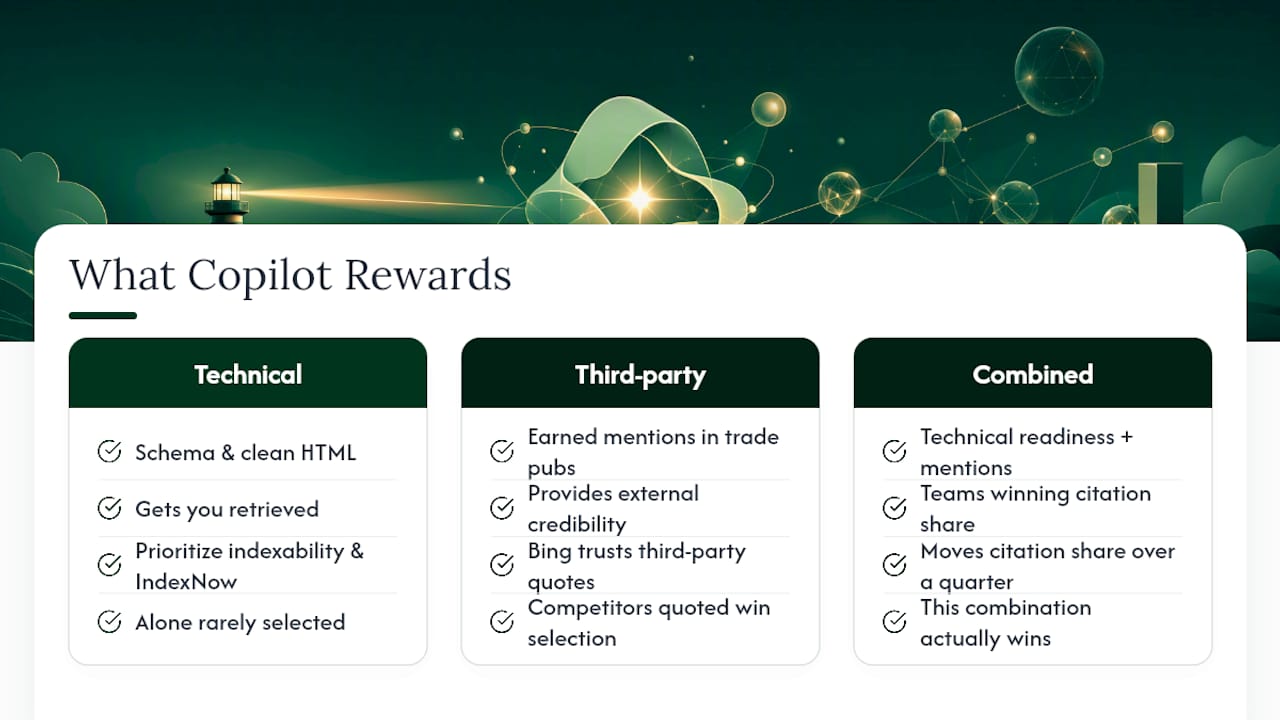
The overlooked piece is third-party validation. A page can hit every extractability best practice and still lose to a competitor who’s been quoted in five trade publications Bing already trusts. Conventional SEO advice treats citations as a markup problem. It’s really a credibility problem, and credibility mostly comes from outside your domain.
If you’re prioritizing one thing first, prioritize indexability and IndexNow, because nothing else works until Bing can see you. But don’t stop there and assume the checklist is the whole game. The teams winning citation share in competitive B2B categories are the ones pairing technical readiness with a steady stream of earned mentions elsewhere. That combination, not either piece alone, is what actually moves Citation Share over a quarter.
— Nik
Get a Bing Copilot Visibility Audit From Storyline Pros
Many agencies bill a monthly retainer whether or not citations are delivered. Some tie their work to delivered placements and measurable citation lift, which matters if previous PR contracts produced coverage not found in AI search.

A Storyline Pros Copilot visibility audit covers the technical layer, indexing, schema, extractability, and the earned media layer competitors usually skip: podcast placements, community amplification, and syndicated coverage designed to be citable. You walk away with a prioritized roadmap and a measurement dashboard tracking citation share over time, not a vague strategy deck. The case studies show what that combination has produced for other high-growth startups working toward investor and customer visibility in AI search. If you want the same starting point, request an audit through Storyline Pros and get a prioritized list of what’s blocking your citations today.
Sources
For the primary sources behind this playbook, see Bing’s AI Performance dashboard announcement, Microsoft’s Copilot transparency and control update, and the Bing Webmaster Guidelines.
- New AI Visibility insights in Bing Webmaster Tools: Intents, Topics, Citation Share, Compare
- What information does Copilot use to answer my prompt? - Microsoft Support
- Bing grounding documentation - Microsoft Learn
- Bing Webmaster Guidelines
FAQ
Can Copilot See What Is on My Screen?
Copilot’s web grounding features pull from Bing’s index and, in Microsoft 365 contexts, from documents you’ve explicitly granted access to. It does not scan your screen contents outside of features you’ve specifically enabled, such as Copilot Vision.
Can Microsoft See Your Copilot Chats?
Microsoft applies enterprise-grade privacy protections to Copilot conversations, and Microsoft support documentation outlines the data boundaries between web grounding and internal organizational content. Specific retention and access policies vary by account type, so check your organization’s admin settings for details.
Is Bing Copilot the Same as Microsoft Copilot?
No. Bing Copilot refers specifically to the web-search-grounded assistant built on Bing’s index, while “Microsoft Copilot” is a broader brand covering integrations across Windows, Edge, and Microsoft 365 that may draw on different data sources depending on context.
How Do I Make Copilot Visible in Outlook?
Copilot in Outlook typically appears as a sidebar or ribbon feature enabled by your Microsoft 365 admin. If it’s missing, check your license tier and admin center settings rather than searching for a user-level toggle, since visibility is usually controlled at the organization level.
How Do I Know if My Content Is Actually Getting Cited by Copilot?
Run direct Copilot queries tied to your target topics and check Bing Webmaster Tools’ AI Performance report for Citation Share and Total Citations data tied to your domain.